Ukulele Chords
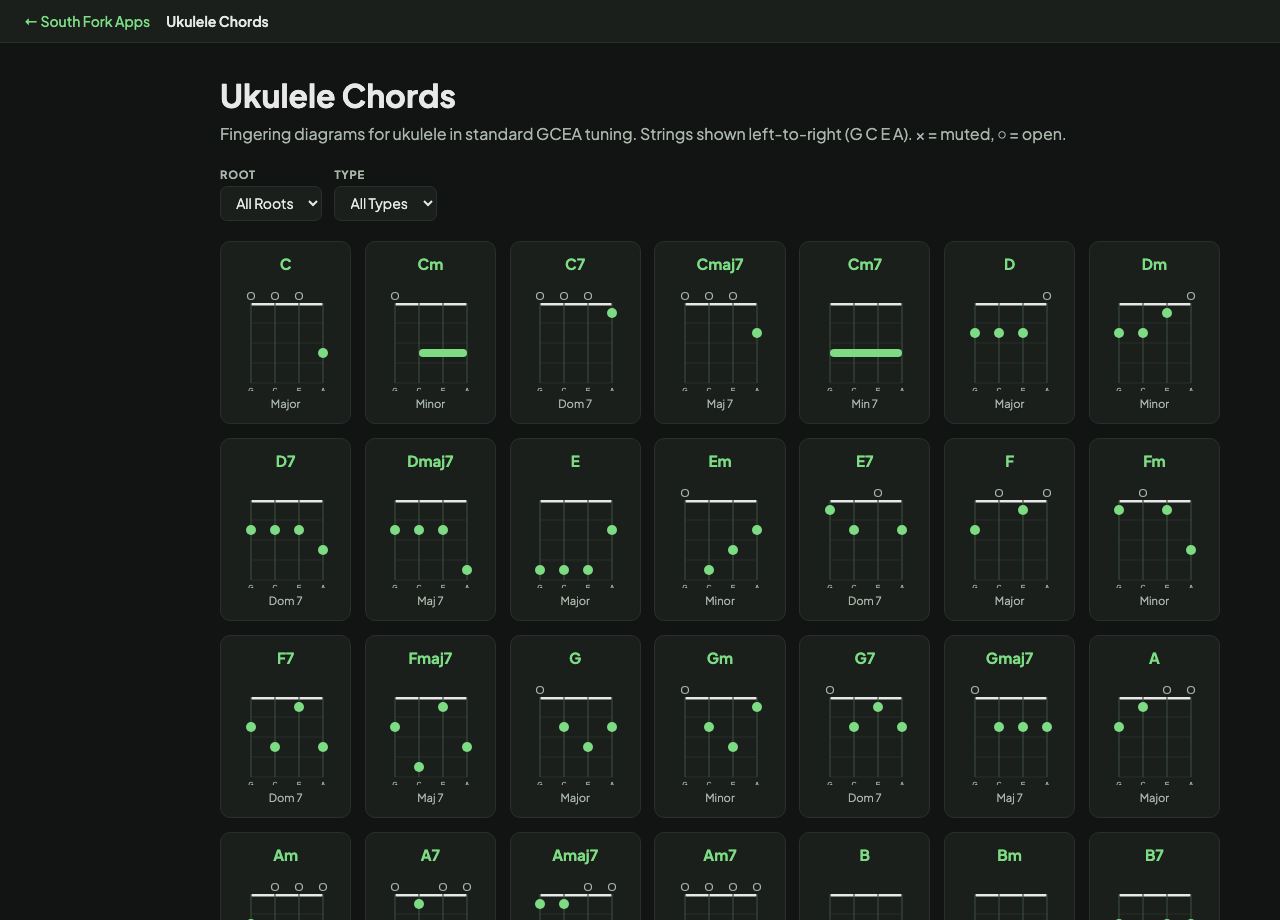
Fingering diagrams for ukulele in standard GCEA tuning. Strings shown left-to-right (G C E A). × = muted, ○ = open.
About this tool
Ukulele Chords
Ukulele Chords is a fingering diagram browser for standard GCEA tuning. Filter by root and chord type and read the shape off the grid, including open strings and any string that should not ring.
How to use it
- Choose a root, or All Roots to browse.
- Choose a chord type, or All Types.
- Read the four-string diagram: numbers are fingers, O is open, X is muted.
Why ukulele chords are easier
Four strings instead of six means most chords need only one, two or three fingers. C major is a single finger on the third fret of the A string.
Because the ukulele has only four strings, chords often leave out the fifth of the chord. That is why a ukulele chord can sound thinner than the same chord on guitar, and why the voicings are not simply guitar shapes moved across.
When it helps
- Learning a song quickly, since most ukulele songs use four or five chords.
- Finding a simpler voicing for a chord that looks awkward.
- Checking a chord you know on guitar to see what it becomes on ukulele.
- Building a first chord vocabulary: C, F, G and A minor cover a huge amount of repertoire.
What this tool handles
- All diagrams assume standard GCEA tuning.
- Shapes without open strings can be moved up the neck to change key.